
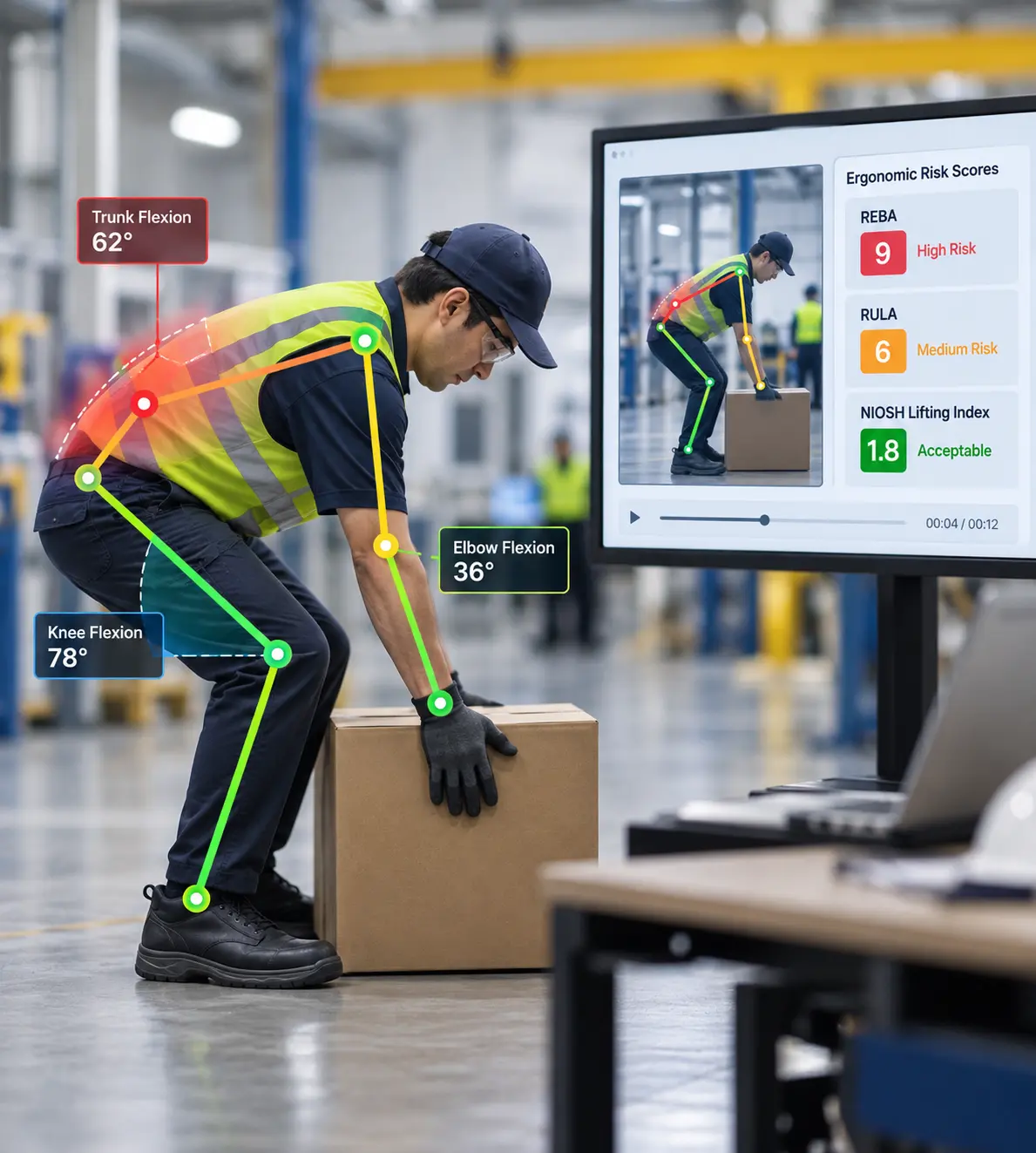
Schedule an Ergonomic Assessment
What is Ergonomics?
Ergonomics is the practice of designing jobs, tools, and workspaces to match workers' physical capabilities. It helps reduce strain, prevent injuries, improve comfort, and enable employees to perform their jobs more safely, efficiently, and consistently.
Musculoskeletal disorders (MSDs) remain one of the leading causes of workplace injuries involving lost or restricted work time, particularly in manufacturing, warehousing, transportation, healthcare, and other physically demanding industries.
OSHA identifies lifting, repetitive motions, awkward postures, and forceful exertions as the primary ergonomic risk factors, while the U.S. Bureau of Labor Statistics reported 2.5 million nonfatal workplace injuries and illnesses in 2024, underscoring the continued need for proactive injury prevention strategies.
Learn the essentials of ergonomics, ergonomic assessments, OSHA guidelines, workplace best practices, and how they help prevent musculoskeletal disorders (MSDs).
The International Ergonomics Association defines ergonomics as: “…the scientific discipline concerned with the understanding of interactions among humans and other system elements, and the profession that applies theory, principles, data and methods to design to optimize human well-being and overall system performance.”
Ergonomics is a science-based discipline that combines anatomy, physiology, psychology, engineering, and statistics to design workplaces, tools, and tasks around people's physical capabilities.
In office ergonomics, this may involve improving workstation setup, equipment positioning, or work practices, while industrial ergonomics addresses the more variable physical demands found in manufacturing, warehousing, transportation, healthcare, and other physically demanding environments.
These definitions provide the foundation, but effective ergonomics requires more than designing a workstation or correcting a single posture. Office ergonomics and industrial ergonomics apply these principles across different workplace environments and job demands. Ergonomics is practiced across multiple disciplines, including safety, engineering, healthcare, and human factors, rather than by a single profession.
Effective ergonomics extends beyond workplace design. It also includes helping employees use equipment, tools, and work practices appropriately. Even a well-designed office ergonomics program will have limited impact if the workstation, work practices, and job demands are not evaluated together.
Ergonomics is therefore a continuous improvement process rather than a one-time initiative. An ergonomic assessment identifies workplace risk factors, but the assessment itself does not prevent an injury. The value comes from translating assessment findings into targeted interventions, measuring whether those interventions work, and refining them as job demands change. This applies equally to office ergonomics and physically demanding industrial environments.
Many ergonomic improvements start as pilot projects before being expanded across the organization. Since ergonomic risks vary by job task, ergonomic assessments should focus on the specific physical demands of each role. Successful implementation also requires collaboration between operations, safety teams, employees, and management to improve adoption and demonstrate a measurable return on investment.
What are the Benefits of Ergonomics?
Ergonomics creates safer, healthier, and more productive workplaces by aligning jobs, equipment, and work environments with employees' physical capabilities. In office ergonomics, this may involve improving workstation setup, equipment positioning, or work practices.
In industrial environments, the focus may extend to material handling, force, repetition, posture, tools, and workflow design. Across both settings, organizations can benefit in three key ways:
Not Sure Where Your Biggest Ergonomic Risks Are?
Our ergonomics specialists analyze job tasks, identify injury risks, and recommend practical improvements that reduce strain while supporting productivity and employee well-being.
Schedule an Ergonomic Assessment
A detailed history of ergonomics could fill several books. Instead, here is a brief overview of how ergonomics has evolved into today's workplace safety and ergonomic assessment practices.
The term "ergonomics" was coined in the United Kingdom in 1949, when the Ergonomics Research Society was established. However, the practice of ergonomics dates back much further. The word itself comes from the Greek words ergon (work) and nomos (law or principle).
As early as the fifth century B.C., Hippocrates described how a surgeon's workspace should be arranged using ergonomic principles. Even in agrarian societies, farm tools were gradually redesigned to improve comfort and ease of use.
The Industrial Revolution in the mid-19th century accelerated the application of ergonomic principles as manufacturing processes evolved to improve worker efficiency and productivity.
During World War II, the growing complexity of human-machine interaction increased interest in ergonomics. Even highly trained pilots struggled with aircraft controls, leading to redesigned control systems and displays that significantly reduced pilot error.
Following WWII, the space program introduced new human factors challenges, including weightlessness and extreme gravitational forces, further advancing ergonomic research.
The rapid adoption of computers transformed office ergonomics, making workstation design a major focus of modern ergonomic practices.
Today, ergonomics extends across both office and industrial environments. From office ergonomics to comprehensive ergonomic assessments in manufacturing, warehousing, healthcare, and transportation, the discipline continues to evolve alongside new technologies, changing work environments, and the widespread use of mobile devices.
An ergonomic assessment is a structured process for identifying physical job demands and workplace risk factors that can contribute to musculoskeletal disorders (MSDs). Organizations that follow a consistent assessment methodology are better equipped to identify hazards, prioritize improvements, and measure results over time. The 4-Step Ergonomic Assessment Framework below outlines the essential stages of an effective ergonomics program.
What Does an Ergonomic Assessment Include?
An ergonomic assessment examines the physical demands of a job, identifies factors that may increase musculoskeletal disorder (MSD) risk, evaluates the severity and frequency of those exposures, and determines which interventions are most appropriate.
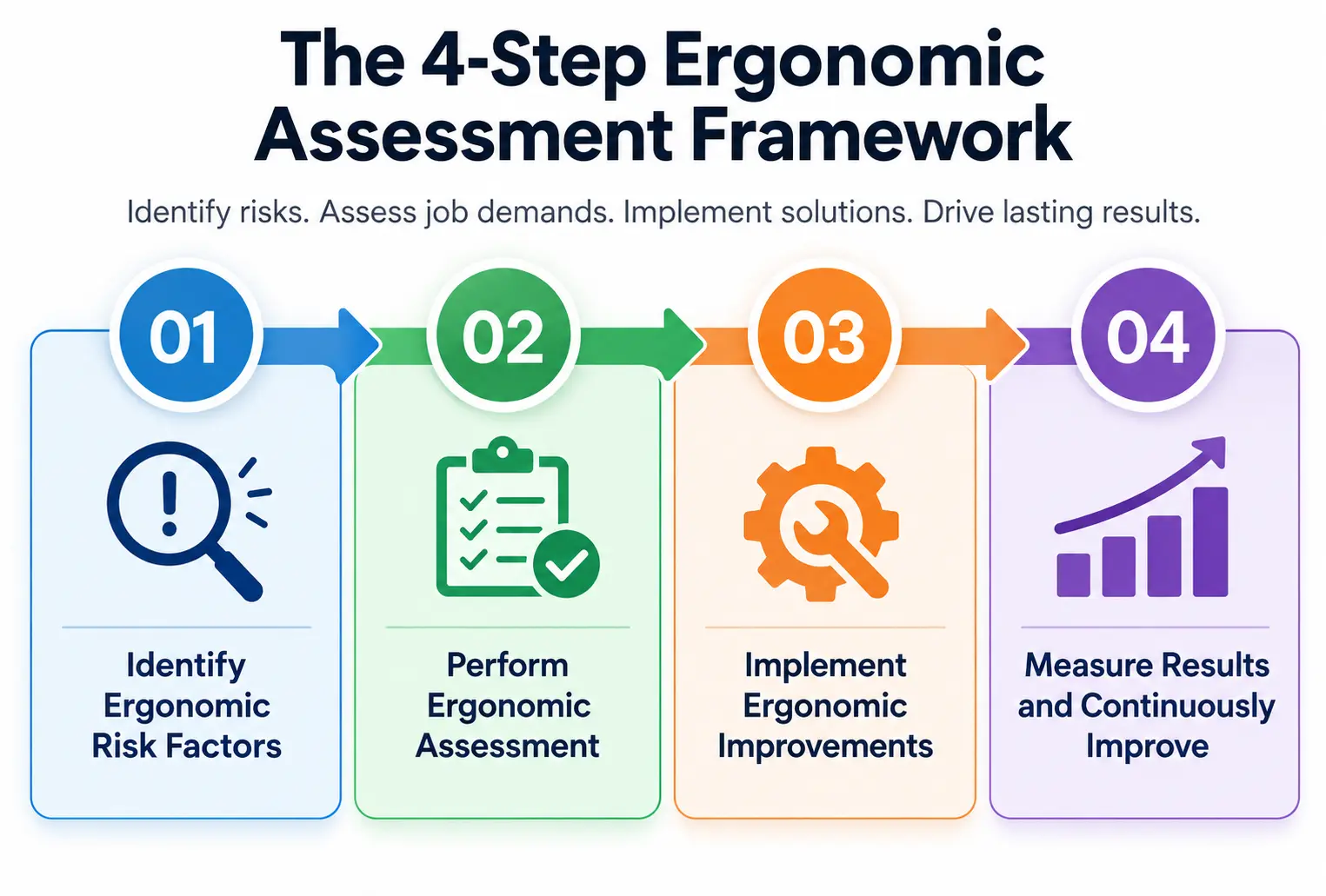
An ergonomic assessment begins by identifying tasks that expose employees to physical stress or have a history of discomfort or injuries. The goal is to determine where ergonomic hazards exist before they result in costly workplace injuries.
How it works
Pro Tip: Don't wait for injuries to occur. Combining injury data with employee discomfort reports helps identify ergonomic risks much earlier, allowing organizations to take preventive action.
Once high-risk tasks are identified, evaluators analyze how employees perform the work. This ergonomic assessment measures body posture, movement patterns, lifting techniques, workstation setup, task frequency, and environmental conditions to quantify the level of risk.
How it works
Pro Tip: Computer vision video-based assessments can provide a more accurate picture than a single observation because they capture movement patterns that may be missed during a live evaluation. When captured correctly, the computer vision systems calculate limb segment position and joint angles, which are then used to develop REBA, RULA, and NIOSH Lifting Equation Scores.
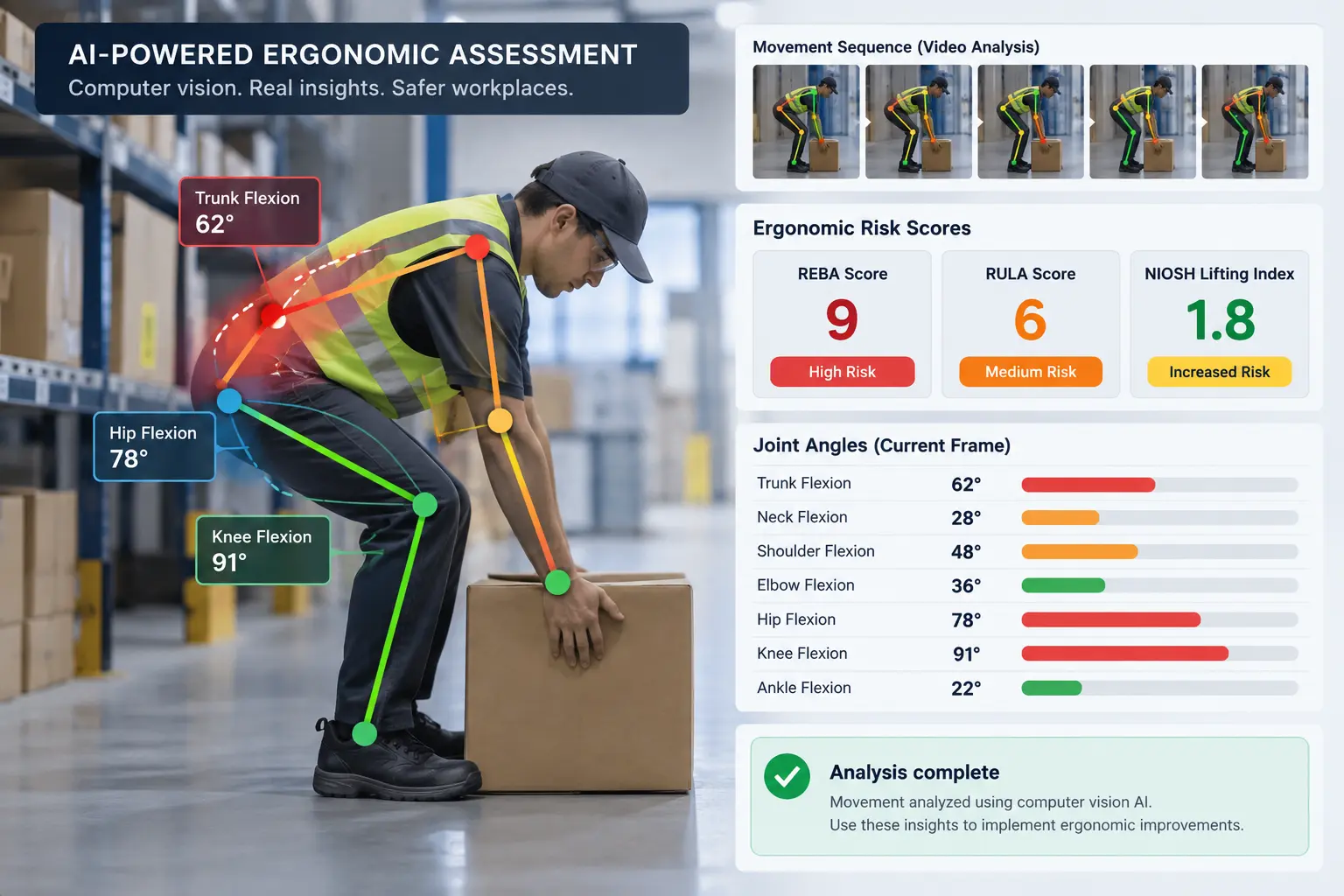
Regardless of the tools used to perform the assessment, the primary goal is to develop recommendations for ergonomic improvements.
Assessment findings are translated into practical solutions that reduce or eliminate workplace risks. Depending on the task, improvements may involve engineering controls, workstation modifications, administrative changes, or employee training.
How it works
Pro Tip: Engineering controls typically provide the most sustainable results because they remove or reduce the hazard instead of relying solely on employee behavior.
An ergonomic assessment is not complete once changes are implemented. Organizations should monitor outcomes to verify that interventions reduce risk and continue improving workplace performance over time.
How it works
Pro Tip: Treat ergonomic assessments as an ongoing improvement process rather than a one-time project. Regular reviews help maintain long-term reductions in injury risk while supporting continuous operational improvement.
Following the 4-Step Ergonomic Assessment Framework helps organizations move beyond reacting to workplace injuries. By systematically identifying risks, evaluating ergonomic hazards, implementing targeted improvements, and continuously measuring outcomes, employers can build a safer workplace while improving employee well-being, productivity, and long-term operational performance.
The terms ergonomic standards and ergonomic guidelines are often used interchangeably, but they have distinct meanings. A standard typically refers to a set of mandatory requirements that must be followed, whereas a guideline provides recommended best practices to help organizations improve workplace ergonomics and reduce risk.
In 2001, under the Clinton administration, OSHA introduced an official Ergonomics Program Standard. However, it was repealed a few months later under the Bush administration.
Today, there is no federal OSHA ergonomics-specific standard. Ergonomic hazards may nevertheless fall under OSHA's General Duty Clause, Section 5(a)(1), when the requirements of that provision are met. OSHA also provides industry-specific ergonomics guidance and recommended program elements that employers can use to identify hazards and develop appropriate controls.
Rather than enforcing a single ergonomic standard, OSHA publishes industry-specific ergonomic guidelines that support workplace safety across sectors ranging from nursing homes to shipyards. These guidelines help employers, safety professionals, and ergonomic consultants identify common hazards, implement effective countermeasures, and follow proven best practices. Each guideline also references relevant regulations, training resources, and supporting documentation for that industry.
OSHA's Recommended Elements of an Ergonomics Program
OSHA does not mandate a single federal ergonomics program model. However, its ergonomics guidance emphasizes several elements that can support an effective program, including:
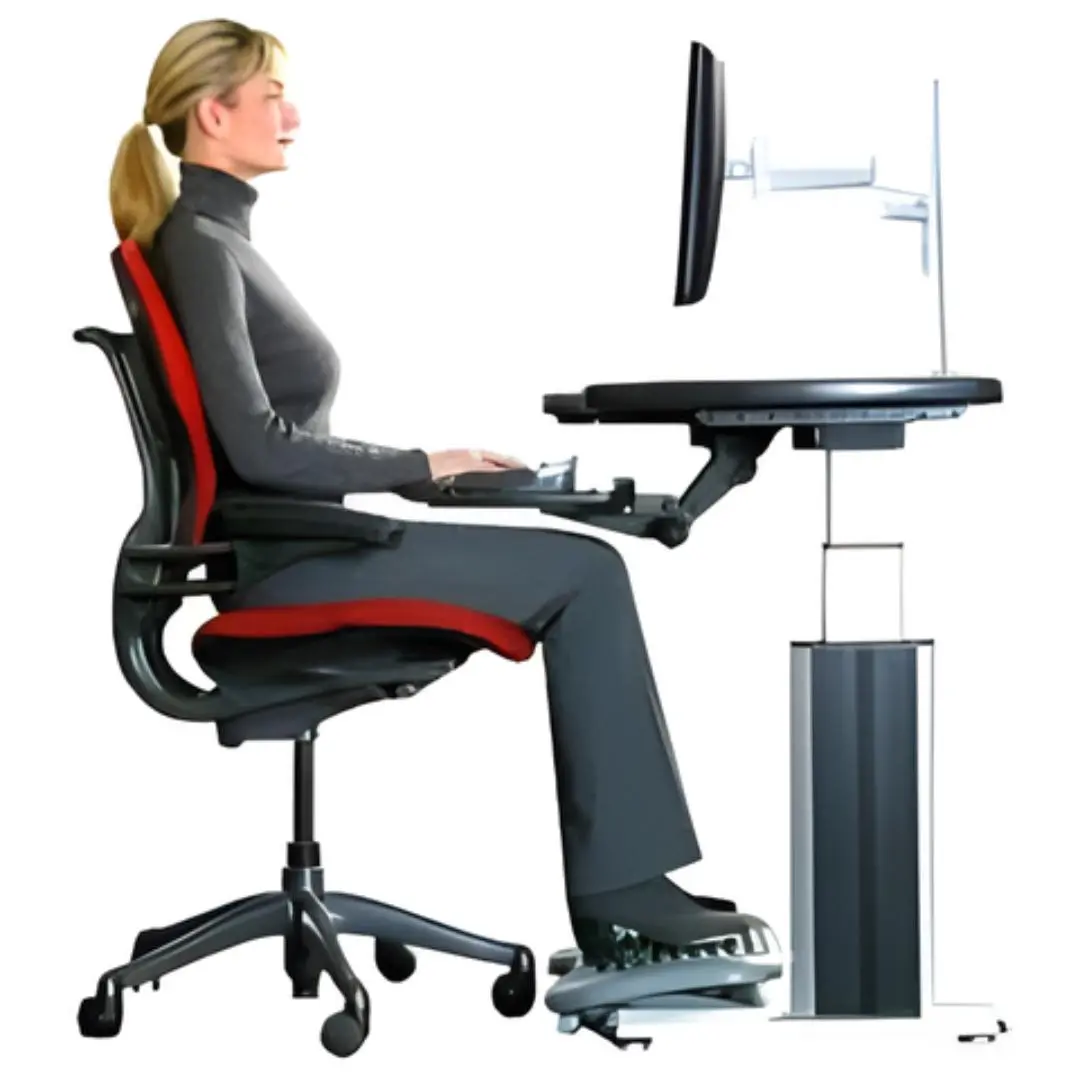
Although specific ergonomic standards do not currently exist at the federal OSHA level, OSHA's extensive guidance demonstrates that workplace ergonomics remains a critical component of injury prevention and a key priority for organizations committed to improving employee safety and reducing musculoskeletal disorders.
Although both office ergonomics and industrial ergonomics aim to reduce workplace injuries and improve productivity, they differ in the work environments they evaluate, the risk factors they address, and the ergonomic assessment methods they use. Understanding these differences helps organizations choose the right assessment approach and implement targeted ergonomic improvements.
A strong office ergonomics assessment evaluates whether the workstation allows the employee to work in comfortable, sustainable positions without unnecessary physical strain. Rather than applying rigid positioning rules to every employee, the evaluator considers the worker's anthropometry, task requirements, equipment, work duration, and ability to adjust the workstation.
Key considerations include:
The ergonomic assessment is typically documented using checklist-based evaluation forms that record the presence or absence of these parameters and identify areas for improvement. Some evaluators recommend general categories of ergonomic equipment, while others provide recommendations for specific makes and models when requested.
Common office ergonomics improvements include:
Sometimes, no new equipment is needed. Proper positioning and use of existing equipment are often enough to resolve the problem.
A common example is a workstation where the monitor is positioned significantly to one side of the user. This can encourage prolonged neck rotation and contribute to neck discomfort or headaches. A simple office ergonomics adjustment is to position the primary monitor directly in front of the user and adjust its height and viewing distance to support a comfortable head and neck position.
Although some software programs claim to help employees adjust their own workstations, accurately performing a self-ergonomic assessment can be difficult. At a minimum, having a coworker take photos or videos provides a more objective view of the current workstation setup.
Another option is a remote office ergonomics assessment. Employees answer guided questions, take prescribed measurements, and submit photos or videos of their workstation. A remote ergonomics evaluator then reviews the information and provides recommendations for improvement.
An ergonomic assessment uses different tools depending on the task being evaluated. Each method measures specific ergonomic risk factors to help identify workplace hazards and guide improvements.
| Tool | Purpose | Common use |
|---|---|---|
| REBA (Rapid Entire Body Assessment) | Assesses whole-body posture and movement. | Manual handling and dynamic work tasks. |
| RULA (Rapid Upper Limb Assessment) | Evaluates upper-body posture. | Office work, assembly, and repetitive upper-limb tasks. |
| Revised NIOSH Lifting Equation | Evaluates manual lifting demands. | Manual lifting assessments. |
| WISHA Lifting Calculator | Screens lifting tasks for ergonomic risk. | Initial lifting evaluations. |
| Revised Strain Index (RSI) | Assesses repetitive hand and wrist strain. | Repetitive upper-extremity work. |
| Snook Tables | Provides recommended weight and force limits. | Lifting, carrying, pushing, and pulling tasks. |
Pro Tip: No single tool works for every job. Ergonomics professionals often combine multiple assessment methods to gain a complete understanding of workplace risks and identify the most effective improvements.
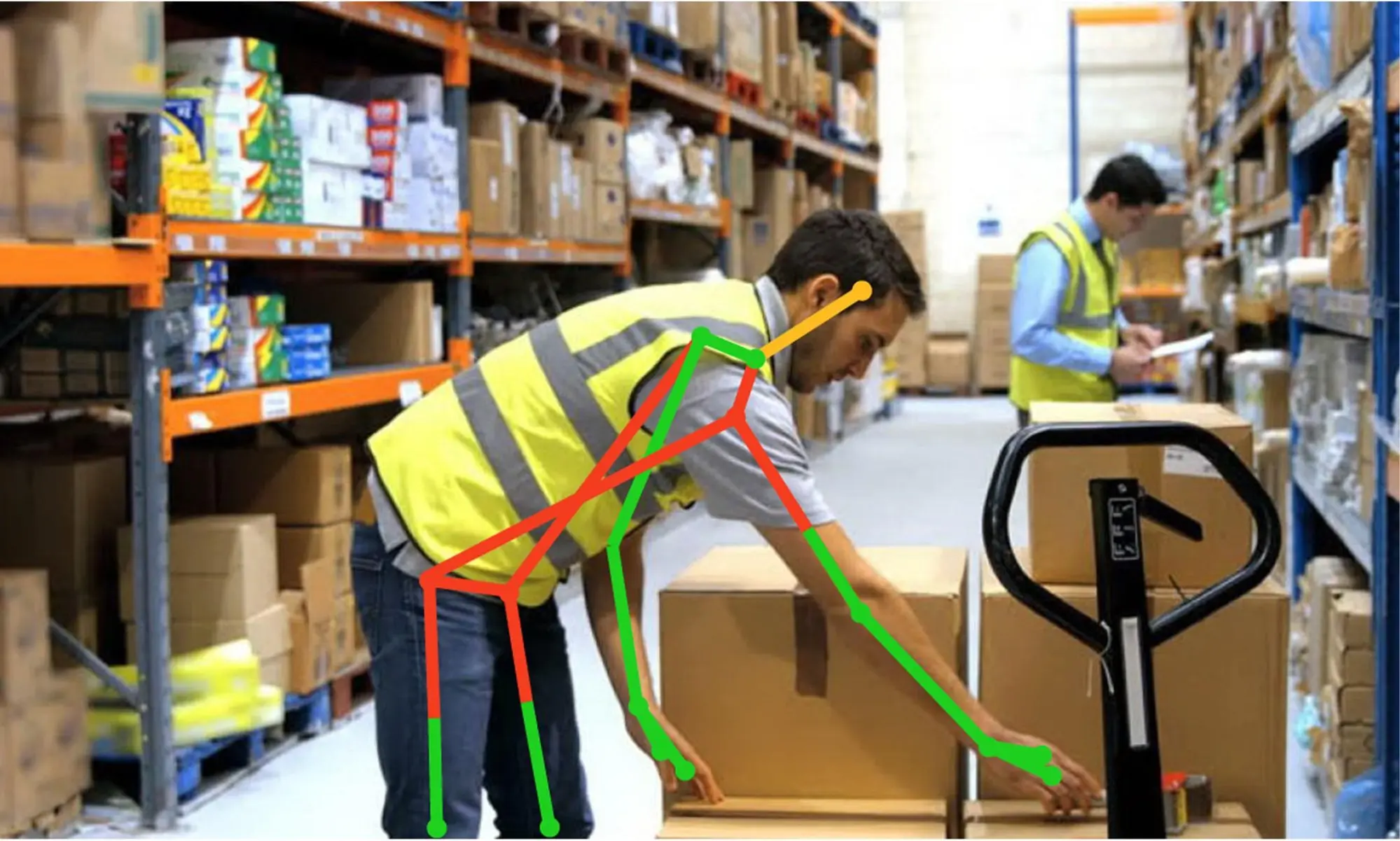
Unlike office ergonomics, an industrial ergonomic assessment evaluates the interaction between employees, equipment, and the physical demands of the job. Rather than focusing solely on workstation setup, industrial ergonomics examines multiple workplace risk factors.
An industrial ergonomic assessment examines:
Workstation height can be a significant ergonomic risk in industrial environments. However, modifying an industrial workstation is often more complex than adjusting an office workstation because changes in one area can affect other production processes or workstations. These modifications are also typically much more expensive than raising an office desk or adding a footrest.
Industrial work also involves a much wider variety of tools and equipment than office ergonomics. In an office environment, employees typically use similar equipment, including:
In industrial settings, however, job demands vary significantly. One role may require screwdrivers and welding equipment, while another relies on pallet jacks and forklifts. Some jobs require employees to frequently change body positions, while others are performed in confined or restricted spaces where maintaining ideal ergonomic posture is not always possible. In some cases, tools can be modified to reduce ergonomic risks, while in others, equipment modifications may be too difficult or costly to implement.
The appropriate assessment method depends on the physical demands and risk factors present in the job. The tools described above can be used selectively for industrial ergonomic assessments involving whole-body posture, upper-extremity repetition, manual lifting, pushing and pulling, or other specific exposures. No single method captures every type of ergonomic risk, so professionals may use multiple methods when a job involves several significant exposures.
In industrial ergonomics, there is a well-known hierarchy of effectiveness for ergonomic countermeasures. See Figure 1 (below).
Figure 1. Hierarchy of Effectiveness of Ergonomic Countermeasures
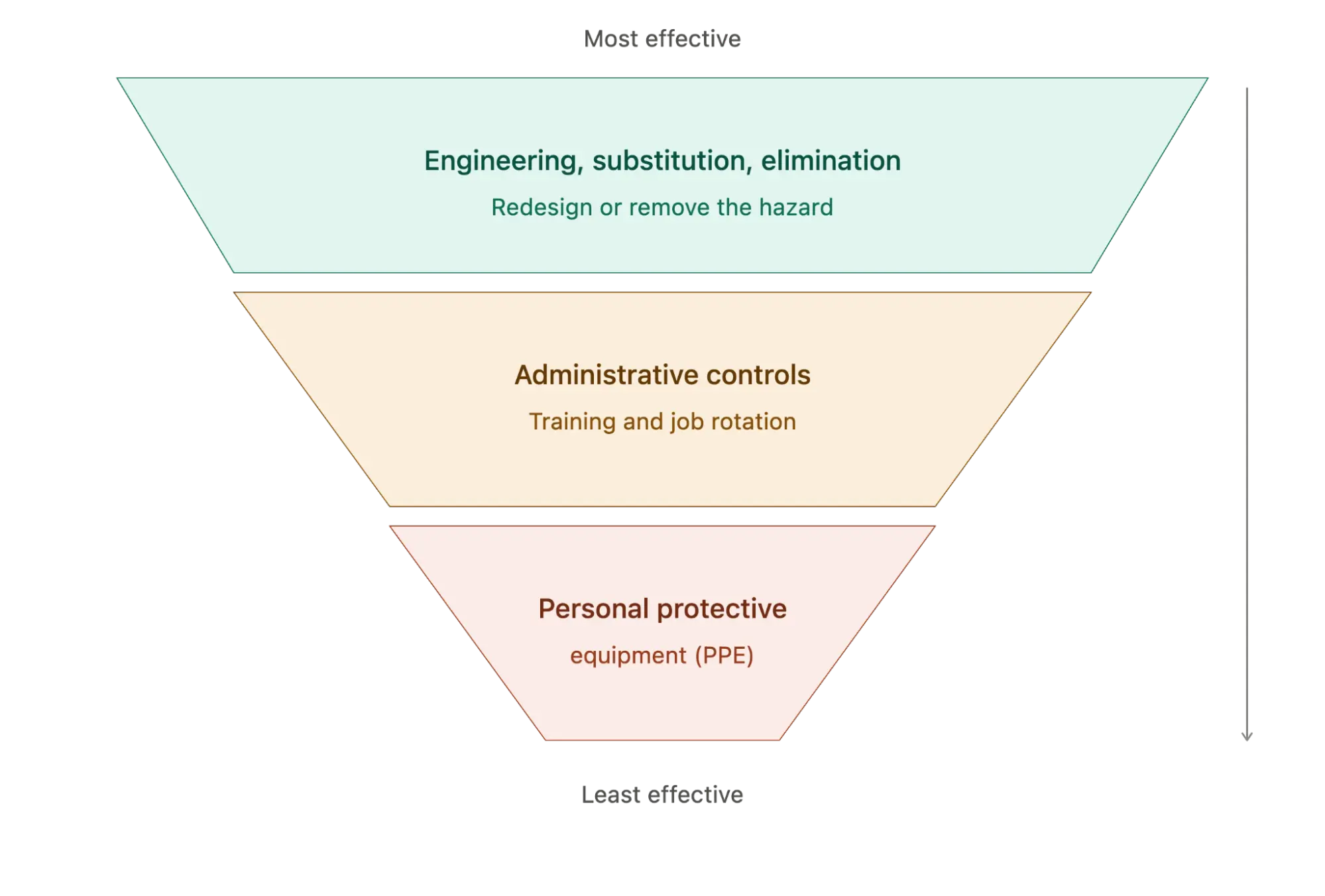
Personal Protective Equipment (PPE) is only as effective as the people who wear it. PPE includes hard hats, hearing protection, safety glasses, and steel-toed shoes. Effectiveness is totally reliant on the employee's cooperation and is in the employee’s control. Thus, it is the least effective of all countermeasures and is at the bottom of the effectiveness scale.
Next to the bottom of the upside-down pyramid are Administrative Controls. These involve strategies such as training employees in the best lifting techniques. They also involve implementing a job rotation plan to minimize each employee's exposure to the hazard.
It’s a bit easier to achieve consistency of implementation with job rotation. However, with a workforce shortage, this may be difficult. Even the most carefully planned job rotation will be abandoned in the spirit of productivity.
Training can reinforce safer work practices, but it cannot reliably compensate for a job that is poorly designed. Employees may understand the recommended technique yet still be unable to sustain it because of the force, repetition, workstation constraints, equipment design, or physical demands of the job. This is why effective ergonomics starts with controlling the hazard wherever practical and uses training to reinforce, rather than replace, those controls.
This is why effective ergonomics addresses the job before relying solely on changes in employee behavior.
Engineering, Substitution, and Elimination are the most effective countermeasures because they significantly reduce or eliminate the ergonomic hazard. If a process can be engineered differently or eliminated, or if another process can be substituted for the hazardous task, the countermeasure typically produces more lasting, effective, and meaningful change.
Unfortunately, these changes are extremely expensive in some situations, requiring a capital investment. In addition, an engineering change in one part of an organization often has a ripple effect on other parts. Given the complexity and expense of these projects, approval and coordination are required. This involves operations, engineering, and C-suite approval to improve ergonomics in the workplace.
Traditional industrial ergonomic assessment tools, despite having "rapid" in their names, often require considerable time to complete and calculate risk scores. More recently, AI-powered ergonomic assessment technology using computer-aided video analysis has helped automate and accelerate portions of the assessment process.
Depending on the platform, video-based systems can quantify selected postures and movement patterns and calculate risk scores with less manual input.
See Figure 2 below. Some platforms can calculate selected assessment methods, including REBA, RULA, the Revised NIOSH Lifting Equation, or the Revised Strain Index, using video capture and limited manual input.
The technology does not replace professional judgment: evaluators still need to determine whether the method is appropriate, interpret the results in the context of the job, and develop feasible interventions.
Figure 2.
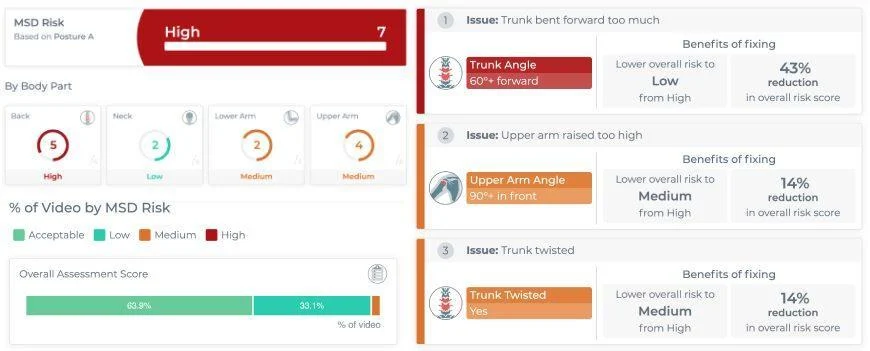
The software calculates an overall risk score and identifies individual risk scores for each body part. From these body-part scores, evaluators can determine which limb segments should be addressed to achieve the greatest improvement in the overall ergonomic assessment score. The evaluator must still develop feasible ergonomic solutions, but the software guides the direction of the intervention.
The technology can also be used for ergonomic training. Most workers are affected by seeing their body position in the video alongside the related risk scores. If they are asked to repeat the task using improved work practices, they can immediately see how the scores change.
The visual feedback makes ergonomic training more meaningful. It also engages the worker in the training process in ways that verbal feedback alone cannot.
Another challenge with training is turning newly learned techniques into lasting habits. Wearable sensor technology can greatly assist in reinforcing ergonomics training in the workplace (see Figure 3 below). The wearable sensor is typically worn on the back or at the waist and acts like an "always there" ergonomic coach.
When bending during lifting exceeds safe levels, workers receive a haptic (vibration) signal. Both the worker and the supervisor receive reports identifying the unsafe movement. Over time, the number of unsafe movements performed during a shift should decrease.
Supervisors and managers can see which workers are improving and which ones need additional assistance over time. The technology can also identify work areas that are especially challenging and may require another ergonomic countermeasure beyond lift training.
Figure 3.

Who Performs Ergonomic Assessments?
Ergonomic assessments are typically performed by ergonomists, occupational health professionals, or trained ergonomics specialists. They evaluate workplace tasks, equipment, and employee movements to identify risk factors and recommend improvements.
A variety of career paths can lead to a specialization in ergonomic assessment and ergonomics.
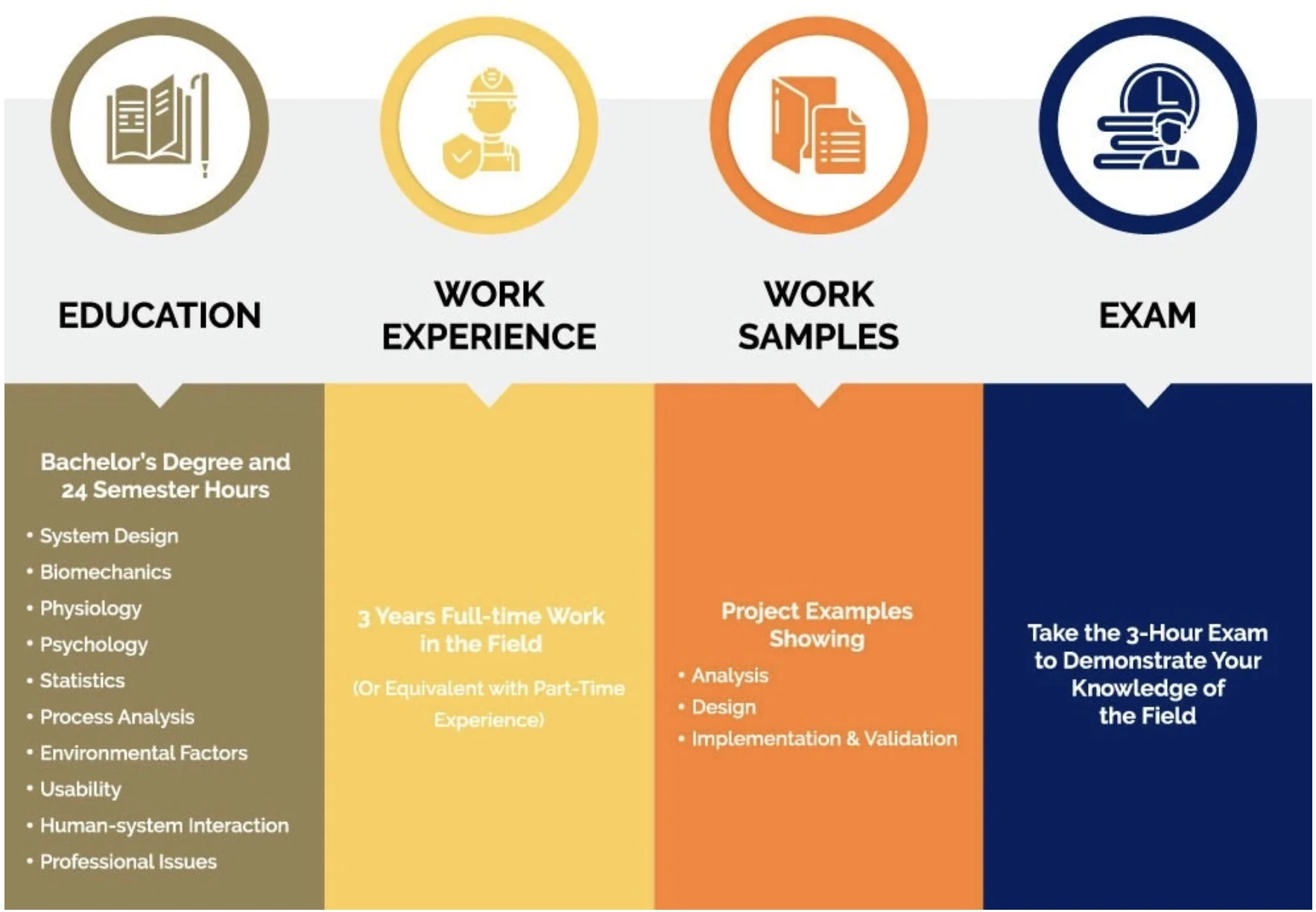
To become certified through the Board of Certification in Professional Ergonomics (BCPE), an individual must earn a graduate degree (MS or PhD) in Human Factors/Ergonomics. Alternatively, candidates may qualify with a bachelor's degree plus 24 semester hours covering the topics listed in Figure 4. This must be followed by three years of full-time work experience, submission of work samples, and successful completion of the certification examination.
Figure 4.
Health and Safety Professionals, including physical therapists, occupational therapists, physical and occupational therapist assistants, athletic trainers, exercise science professionals, safety managers, risk managers, and nurses, can develop expertise in ergonomic assessment through continuing education courses that typically last from one to five days. Some of these courses also offer certifications, such as the Certified Ergonomic Assessment Specialist (CEAS) offered through the Back School of Atlanta.
Naturally, these continuing education programs are not as academically rigorous as the CPE certification offered through the BCPE. However, much of the practical ergonomic assessment work performed in the field is carried out by experienced health and safety professionals who combine practical workplace experience with specialized ergonomics training.
Obviously, ergonomic assessment and training involve certain costs. So, the question becomes: Does it really work? Does it save employers money? Evidence suggests that it does.
But first, let’s consider the true costs of a workplace musculoskeletal injury. Many don’t realize that the total costs must include both direct and indirect costs.
Direct costs include the obvious, easy-to-calculate expenses:
The list of indirect costs is much more extensive and includes:
OSHA estimates the direct-to-indirect cost ratio ranges from 1:1.1 to 1:4.5, depending on the cost of the injury. The true costs of injuries can be grossly underestimated if only the more easily calculated direct costs are considered.
The table below shows the sales volume needed to offset the cost of an injury at different profit margin levels. A company operating at a 2% profit margin would have to increase sales by $500,000 to pay for a $10,000 injury.
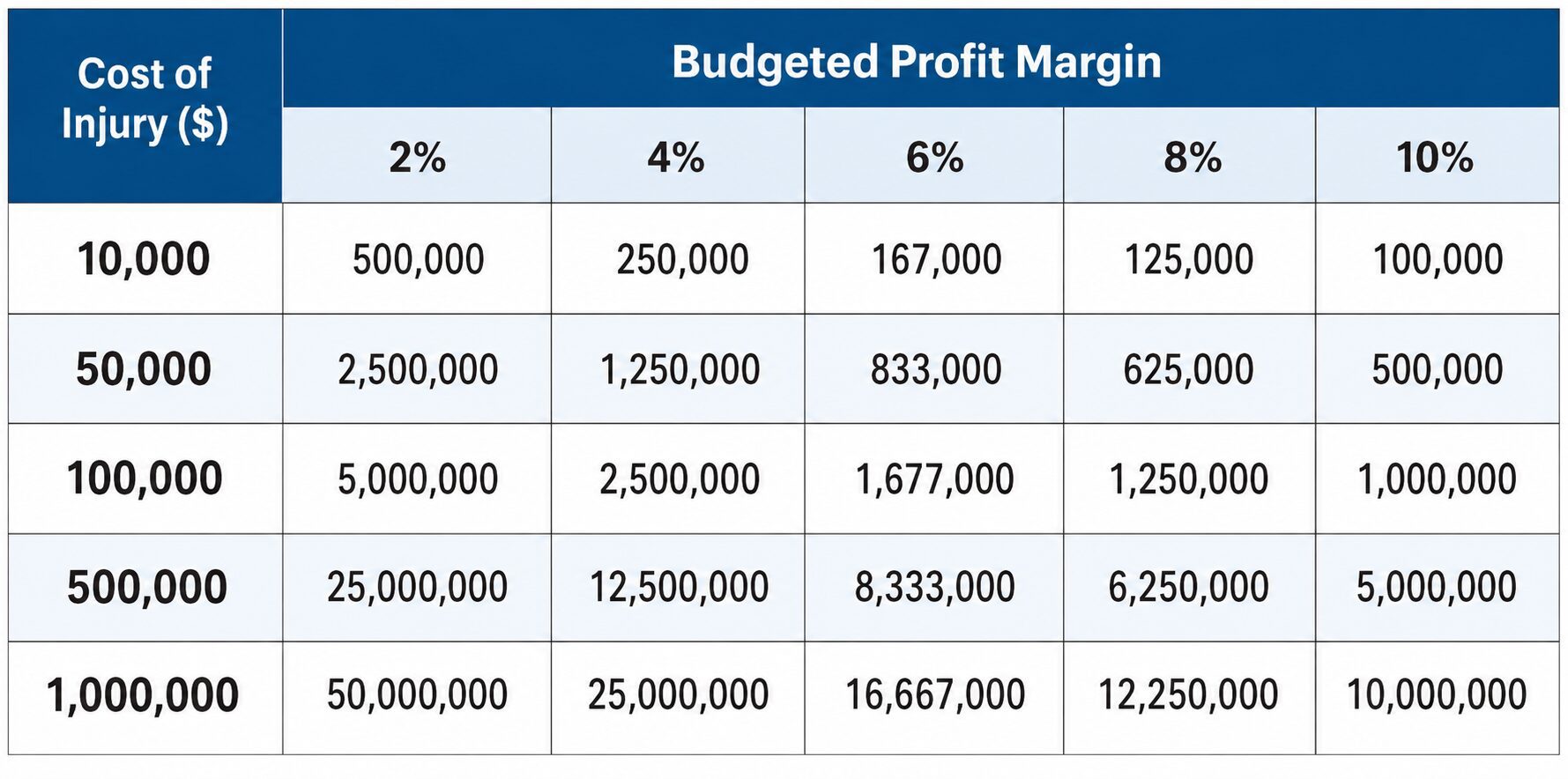
Given the cost of work-related injuries and the impact on profitability, cost reduction is key.
Peer-reviewed research supports ergonomics as an effective approach for reducing occupational risk factors and lowering injury-related costs when interventions are appropriately designed and implemented.
A research review published in 2008 examined 18 case studies, most of which were published by the National Safety Council.
The reviewed case studies reported average improvements including:
The individual studies also reported payback periods as short as 8 months, with reported returns ranging from 2:1 to 10:1. These figures represent outcomes from the reviewed programs and should not be treated as universal benchmarks for every ergonomics initiative.
Another literature review published in 2010 showed the financial benefits of ergonomic changes across many sectors. The ergonomic changes included worker ergonomic training, equipment redesign, and work reorganization. In the administrative and support sector, changes focused on workstation equipment and training for office workers.
Mechanical patient lifts and participatory ergonomic teams were used in healthcare. Ergonomic interventions in the manufacturing and warehouse sectors ranged from engineering controls to educational programs. Regardless of the specific changes, researchers found strong evidence supporting a financial return on investment from ergonomic assessments and ergonomic interventions across all sectors.
Additional individual studies also support the cost-effectiveness of ergonomics in the workplace. In one study, a robotic palletizer that replaced a warehouse manual material handling task cost $300,000, increased productivity, and decreased back injury claims, creating a 6% return on investment in just three years.
A large electrical utility company implemented a battery-operated press and cutter, recouping its investment in four months. Ergonomic changes on an assembly line at a circuit manufacturer created an annual return on investment of 73%.
The evidence supports ergonomics as an effective strategy for reducing workplace risk and improving operational outcomes when interventions are appropriately designed and implemented. Ergonomic assessments can help organizations identify risk factors, while targeted interventions can reduce exposures, support productivity, and lower injury-related costs.
The exciting news is that ergonomic assessment and training are important components of an even more comprehensive workplace MSD prevention program. Additional programs that complement ergonomics in the workplace include:
Pre-Hire/Post-Offer Physical Abilities Testing helps employers hire employees who are physically capable of performing their jobs. If employees have this baseline physical ability, ergonomic assessment and ergonomic training are much easier to implement. Under the Equal Employment Opportunity Commission (EEOC) and the Americans with Disabilities Act (ADA), these tests need to be job-specific. A thorough job analysis is needed to provide the basis for defensible testing to implement ergonomics in the workplace.
Employees entering physically demanding roles may need time to adapt to the strength, endurance, repetition, and work pace required by the job.
Even if they can handle the physical requirements during a pre-hire test, it’s optimal for them to work gradually. A structured ramp-in process can progressively increase exposure to the physical demands of the role while reinforcing appropriate work practices and providing an opportunity to identify emerging concerns early.
Once hired and trained, early MSD symptoms can be addressed with an OSHA-compliant Early Intervention Program (EIP). With this program, employees self-identify as having discomfort. An onsite EIP practitioner (typically an athletic trainer or physical or occupational therapist) provides first-aid treatments relevant to the musculoskeletal system that are approved by OSHA.
EIP also creates an opportunity to review ergonomic best practices with the employee. Recommendations identified during an ergonomic assessment can be reinforced during early intervention, helping address emerging concerns before they progress into more serious or recordable injuries.
When a lost-time injury occurs, the question eventually becomes: When can the employee return to work? A return-to-work physical abilities test can be used to determine the worker’s ability to perform the physical requirements of the job.
If a worker is not yet able to meet the physical demands of the job, work conditioning can help rebuild the strength, endurance, and functional capacity needed for a safe return. The program can also reinforce ergonomic recommendations and identify physical or job demands that may require modification before the employee resumes full duties.
During work conditioning, ergonomic best practices can be reviewed, and recommendations from the ergonomic assessment can be reinforced. This creates another opportunity to address contributing job demands and support a sustainable return to work.

Ergonomics is most effective when it is connected to the broader systems that shape how employees enter, perform, and return to physically demanding work.
An ergonomic assessment addresses risks during daily job execution, but lasting prevention requires a broader system that begins before hiring and continues through return to work. Job analysis, physical abilities testing, work acclimation, ergonomics, early intervention, and objective return-to-work testing address different points in the employee lifecycle.
ErgoScience helps employers build comprehensive injury prevention programs that extend beyond a single assessment or training intervention. Its approach connects job analysis, job-specific physical abilities testing, office ergonomics, industrial ergonomic assessments, ergonomic training, early intervention, stretch and flex programs, and return-to-work fitness-for-duty testing into a broader strategy for reducing MSD risk and supporting safer, more sustainable workforce performance.
This integrated approach reflects a core principle of effective injury prevention: the job, the worker, and the intervention need to be evaluated together rather than managed as separate safety activities.
Contact ErgoScience to identify the ergonomic and physical demands creating the greatest injury risk and determine how office ergonomics, industrial ergonomics, and broader injury prevention strategies can work together.
Build a More Proactive Injury Prevention Program
Ergonomics is the science of designing jobs, tools, and work environments to fit the people who use them. In the workplace, ergonomics helps reduce physical strain, prevent musculoskeletal disorders (MSDs), improve employee comfort, and make work safer and more productive.
Ergonomics helps employers reduce workplace injuries by identifying and minimizing ergonomic risk factors such as awkward postures, repetitive motions, forceful exertions, and manual material handling. It also improves employee comfort, productivity, and overall workplace performance.
The main benefits of ergonomics include fewer workplace injuries, greater employee comfort and job satisfaction, and higher productivity. By matching work to workers' physical capabilities, organizations can reduce fatigue, improve work quality, and lower injury-related costs.
Office ergonomics focuses on computer workstations, seating, monitor placement, and keyboards to reduce strain during prolonged computer use. Industrial ergonomics evaluates physically demanding work, including lifting, repetitive tasks, awkward postures, material handling, and equipment use in manufacturing, warehousing, transportation, and similar industries.
An office ergonomics assessment evaluates how a worker interacts with their workstation, including the chair, desk or work surface, monitor, keyboard, mouse, telephone, and other frequently used equipment. A comprehensive office ergonomics evaluation also considers work duration, posture, reach, workstation adjustability, and the specific tasks the employee performs throughout the workday.
No. OSHA does not currently have a federal ergonomics standard. Instead, employers are expected to address ergonomic hazards under OSHA's General Duty Clause, while following OSHA's industry-specific ergonomic guidelines and recommended ergonomics program elements.
Ergonomic assessments should be conducted whenever new equipment, workstations, or job tasks are introduced, after injury trends emerge, or when employees report discomfort. Many organizations also perform periodic assessments as part of their ongoing workplace injury prevention strategy.
A single ergonomic assessment can reduce workplace risks, but lasting results come from integrating ergonomics into every stage of the employee lifecycle. A comprehensive prevention strategy helps reduce injuries, improve productivity, and lower long-term workers' compensation costs.
Ready to build a comprehensive injury prevention program that goes beyond ergonomics?Talk to an Ergonomics Expert